Turn Any Lecture Into Perfect Flashcards
Upload a lecture recording, slides, or even raw audio and get study-ready flashcards in under 2 minutes. Works with any subject, any format, any length.
Visual Study Guides from Your Lectures
LectureScribe doesn't just make flashcards. It also generates visual infographics that summarize your lecture content so you can review key concepts at a glance.
- Auto-generated from lecture audio or slides
- Covers definitions, diagrams, and key takeaways
- Download or share with classmates
- Perfect for last-minute revision
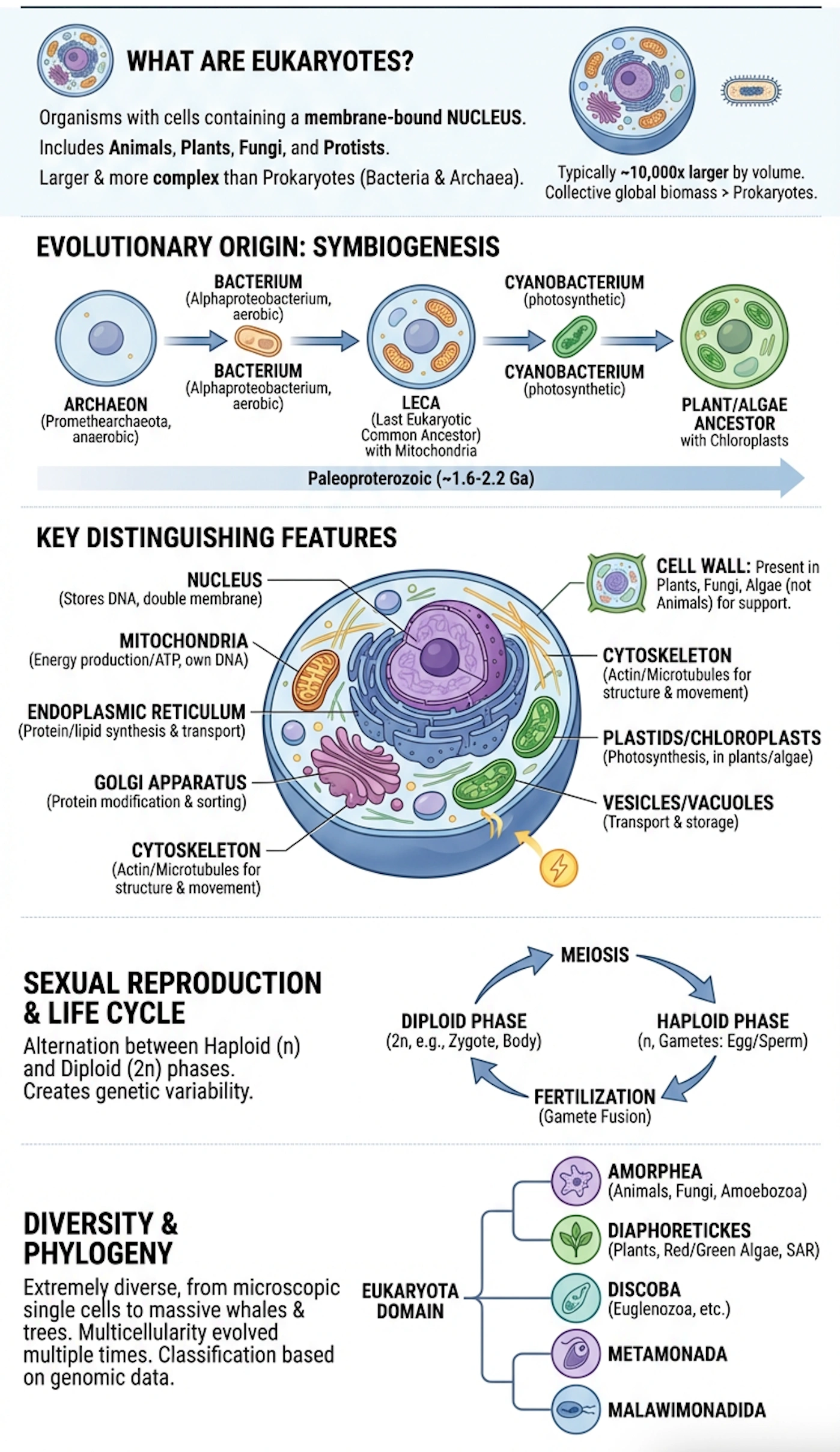
Sample Infographic
Generated automatically from a 50-min lecture
Bite-Size Review Shorts
Get auto-generated short-form video summaries of your lectures. Scroll through key points like a social feed right before an exam.
Auto-generated from your lecture recordings
Cell Division Recap
Mitosis vs Meiosis
Cognitive Biases
Anchoring & Framing
French Revolution
Causes & Timeline
Fiscal Policy 101
Taxes & Spending
How do you turn lectures into flashcards?
Upload your lecture recording, slides, or notes to LectureScribe. AI transcribes the audio, extracts key concepts, and generates study-ready flashcards in under 2 minutes. Review online or export to Anki and Quizlet.
Sound Familiar?
Common lecture-to-flashcard struggles we solve
Hours of manual flashcard creation
AI generates a full deck from your lecture in under 2 minutes. Zero typing required.
Missing key concepts
AI identifies every important definition, process, and comparison so nothing slips through.
Audio-only lectures with no slides
Upload raw audio and LectureScribe transcribes it, then extracts flashcard-worthy content automatically.
Inconsistent, scattered notes
Get a uniform, structured flashcard deck every time, regardless of how messy your source material is.
How It Works
From upload to study-ready in 3 steps
Upload Your Lecture
Drag and drop audio, video, slides, or a PDF of your lecture notes. All major formats supported.
AI Processes Content
AI transcribes audio, reads slides, and identifies the most important concepts and definitions.
Get Your Flashcards
Review your AI-generated deck, edit if needed, then study online or export to Anki or Quizlet.
Everything You Need
The most complete lecture-to-flashcard tool for students
Audio & Video Upload
Upload MP3, M4A, MP4, or WAV lecture recordings of any length.
AI Concept Extraction
AI pinpoints definitions, processes, and key facts from your content.
10x Faster
Generate a full flashcard deck in under 2 minutes instead of hours.
Export to Anki & Quizlet
One-click export to Anki, Quizlet, CSV, or PDF for your workflow.
Visual Infographics
Auto-generated visual summaries alongside your flashcards.
Practice Quizzes
Turn the same lecture into mock-exam questions with AI quiz generation.
AI Study Video Preview
Generated from your content
AI Study Videos from Your Lectures
LectureScribe can also turn your lecture content into short, narrated study videos you can review on the go.
- Auto-narrated summaries of key topics
- Shareable with study groups
- Great for visual and auditory learners
- Generated alongside flashcards
What Students Are Saying
“I recorded a 90-minute biology lecture and had a perfect flashcard deck in less than 2 minutes. This is a game-changer for exam prep.”
“I used to spend Sunday evenings making flashcards from my lecture notes. Now I just upload the recording and I'm done in minutes.”
“The AI caught concepts from my philosophy lecture that I completely missed in my own notes. The flashcards are genuinely high-quality.”
Frequently Asked Questions
What lecture formats can I upload?
You can upload audio recordings (MP3, M4A, WAV), video files (MP4, MOV), slide decks (PDF, images), or even photos of handwritten notes. LectureScribe handles them all.
How long does it take to generate flashcards from a lecture?
Most lectures are processed in under 2 minutes regardless of length. A typical 60-minute recording produces 30-60 high-quality flashcards.
Can I edit the AI-generated flashcards?
Absolutely. After generation you can edit any question or answer, delete cards, add new ones, or reorganize the deck before studying or exporting.
Does it work for all subjects?
Yes. LectureScribe works across all disciplines including STEM, humanities, social sciences, business, and more. The AI adapts to the terminology and structure of each field.
Can I export my flashcards to Anki or Quizlet?
Yes. One-click export to Anki (.apkg), Quizlet-compatible CSV, standard CSV, PDF, and JSON is built in. Use whichever study platform you prefer.
Is it free to try?
Yes. You get 1 free upload with no credit card required. Upload a lecture, generate flashcards, and see the quality before committing to a plan.
Ready to Turn Your Lectures Into Flashcards?
Join 50,000+ students who save hours every week. Upload your first lecture free.
Get Started Free