Drop Any PDF, Get Instant Flashcards
Upload a textbook chapter, research paper, or class handout as a PDF and get a study-ready flashcard deck in under 2 minutes. No more highlighting and retyping.
Visual Summaries from Your PDFs
Beyond flashcards, LectureScribe generates visual infographics that distill dense PDF content into scannable, shareable study guides.
- Automatically extracts key information from PDFs
- Converts dense text into visual summaries
- Download or share with classmates
- Ideal for textbook chapters and research papers
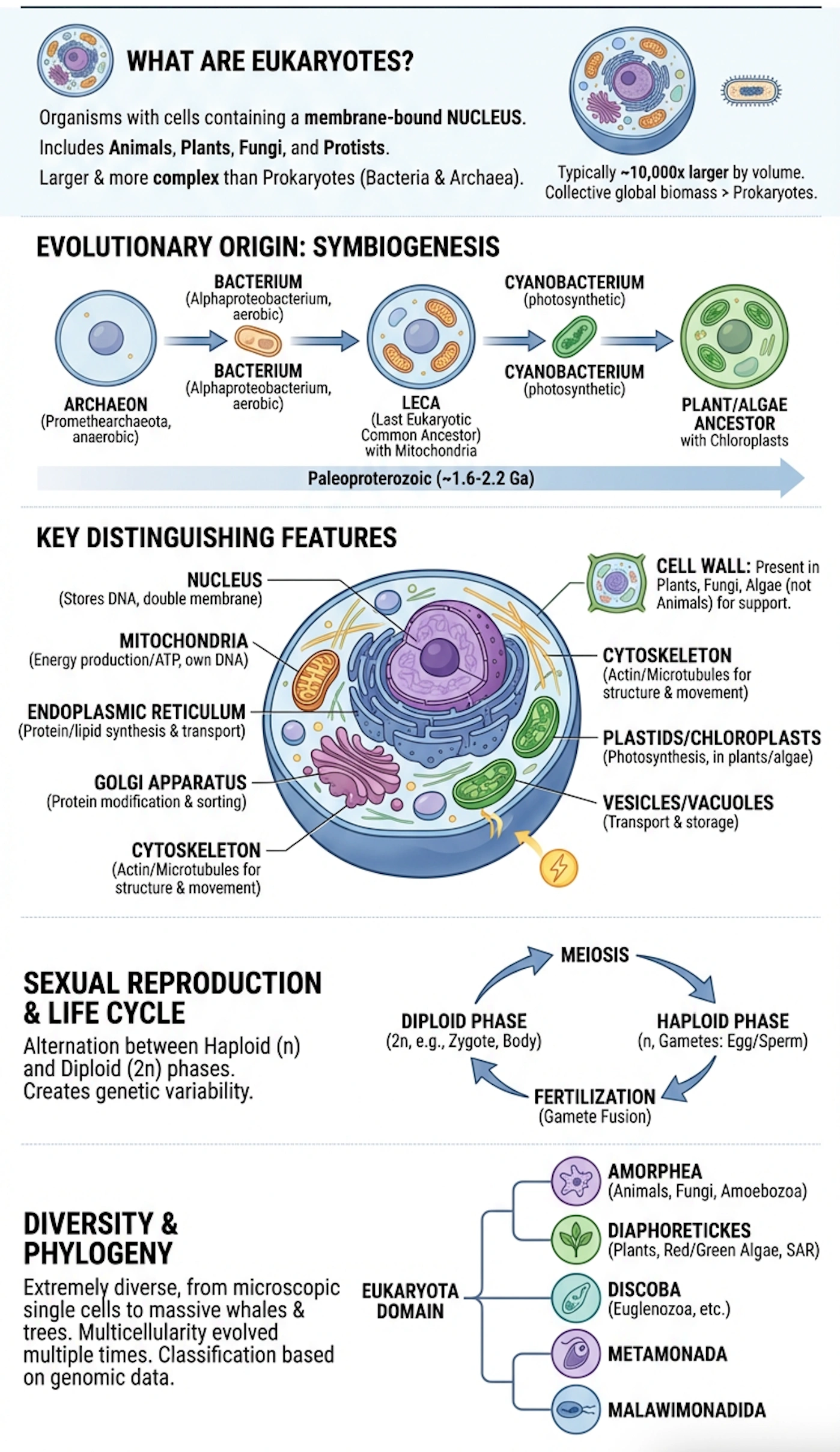
Sample Infographic
Generated from a 40-page textbook chapter
Quick Recap Shorts
Auto-generated short-form video summaries from your PDFs. Scroll through the highlights like a social feed before your exam.
Auto-generated from your uploaded PDFs
Organic Chemistry Recap
Functional Groups
Macro Econ Overview
GDP & Inflation
Constitutional Law
Key Amendments
Cell Signaling
Pathways & Receptors
How do you make flashcards from a PDF?
Upload your PDF to LectureScribe. AI reads and parses the document, identifies key definitions, concepts, and facts, then generates a complete flashcard deck in under 2 minutes. Review online or export to Anki and Quizlet.
Sound Familiar?
Common PDF-to-flashcard struggles we solve
Manual extraction takes forever
AI reads your entire PDF and pulls out flashcard-worthy content in seconds. No copy-paste, no retyping.
Missing key points in long documents
AI scans every page and identifies definitions, formulas, and critical facts you might skim over.
Unstructured highlights everywhere
Get a clean, organized flashcard deck from even the messiest highlighted PDF.
Hours wasted on formatting
AI creates perfectly formatted Q&A pairs instantly. Spend your time studying, not formatting.
How It Works
From upload to study-ready in 3 steps
Upload Your PDF
Drag and drop any PDF — textbook chapters, lecture slides, research papers, or handouts.
AI Extracts Key Concepts
AI reads every page, identifies definitions, formulas, and important facts automatically.
Study or Export
Review your flashcard deck, edit as needed, then study online or export to Anki and Quizlet.
Everything You Need
The most powerful PDF-to-flashcard converter for students
Any PDF Format
Works with textbooks, slides, research papers, handouts, and scanned documents.
Smart Extraction
AI identifies definitions, key terms, formulas, and critical concepts automatically.
Instant Generation
Get a complete flashcard deck in under 2 minutes from any PDF length.
Export Anywhere
One-click export to Anki, Quizlet, CSV, or PDF format.
Visual Infographics
Auto-generated visual summaries alongside your flashcards.
Practice Quizzes
Turn your PDF into mock-exam questions with AI quiz generation.
AI Study Video Preview
Generated from your content
AI Study Videos from Your PDFs
LectureScribe can also turn your PDF content into short, narrated study videos for on-the-go review.
- Auto-narrated summaries of key topics
- Shareable with study groups
- Great for visual and auditory learners
- Generated alongside flashcards
What Students Are Saying
“I uploaded a 60-page biochemistry PDF and had a perfect flashcard deck in about 90 seconds. This saves me entire evenings of work.”
“I have stacks of PDF handouts from every class. Now I just drop them in and instantly have study cards ready for finals.”
“The AI pulled out concepts from my research methods PDF that I had highlighted but never turned into study material. Huge time saver.”
Frequently Asked Questions
What types of PDFs can I upload?
You can upload any PDF including textbook chapters, lecture slides exported as PDF, research papers, class handouts, and even scanned documents. LectureScribe handles them all.
How many flashcards does a typical PDF produce?
It depends on the content density. A 20-page textbook chapter typically produces 40-80 flashcards. A 5-page handout may produce 10-20 cards. You can always add or remove cards after generation.
Can I edit the AI-generated flashcards?
Yes. After generation you have full control to edit questions and answers, delete cards, add new ones, or reorganize the deck.
Does it work with scanned or image-based PDFs?
Yes. LectureScribe uses OCR (optical character recognition) to extract text from scanned documents and image-based PDFs before generating flashcards.
Can I export flashcards to Anki or Quizlet?
Absolutely. One-click export to Anki (.apkg), Quizlet-compatible CSV, standard CSV, PDF, and JSON is included.
Is it free to try?
Yes. You get 1 free upload with no credit card required. Drop a PDF, generate flashcards, and see the quality before committing to a plan.
Ready to Turn Your PDFs Into Flashcards?
Join 50,000+ students who save hours every week. Drop your first PDF free.
Get Started Free