Notes Generator: Create & Export to Word, PDF
The fastest way to generate study notes. Upload lectures, videos, or PDFs and get structured notes instantly. Export to Word, PDF, or Google Docs with one click.
AI Notes Generator
Generate & export anywhere
Export Notes to Word, PDF & Google Docs
Your AI-generated notes, perfectly formatted and ready to use anywhere. Export with one click — headings, structure, and formatting are all preserved.
- Word (.docx) — Open in Microsoft Word or Google Docs
- PDF — Print-ready with clean formatting
- Google Docs — Direct export to your Drive
- All headings, bullet points, and structure preserved
- Perfect for sharing with study groups
Word Document
Lecture_Notes_Chapter_3.docx
PDF Document
Lecture_Notes_Chapter_3.pdf
Google Docs
Lecture_Notes_Chapter_3.gdoc
Bite-Sized Study Shorts for On-the-Go Review
Get quick AI-generated video shorts that summarize your notes into 60-second visual reviews. Watch anywhere, review anytime.
New shorts generated from each lecture you upload
Key Concept Review
60-second summary
Lecture Highlights
Quick topic overview
Exam Prep Notes
Must-know concepts
What is the best AI notes generator?
The best AI notes generators in 2026 are: (1) LectureScribe — Best overall for auto-generating notes from lectures with export to Word, PDF, and Google Docs ($0-12/mo), (2) Notion AI — Best for manual note-taking with AI assistance ($0-10/mo), (3) Otter.ai — Best for live transcription ($0-17/mo).
| Feature | LectureScribe | Notion AI | Otter.ai |
|---|---|---|---|
| AI Note Generation | ✓ | Partial | ✗ |
| Upload Lectures/PDFs | ✓ | ✗ | Audio only |
| Export to Word (.docx) | ✓ | ✗ | ✗ |
| Export to PDF | ✓ | ✓ | ✓ |
| Export to Google Docs | ✓ | ✗ | ✗ |
| Creation Time | < 3 min | Manual | Real-time |
| Flashcard Generation | ✓ | ✗ | ✗ |
| Pricing | $0-12/mo | $0-10/mo | $0-17/mo |
Note-Taking Shouldn't Be This Hard
Here's how our notes generator helps
Taking notes during lecture is impossible
Record your lecture and let AI generate comprehensive notes afterward. Never miss key concepts because you were too busy writing.
Notes are messy and unorganized
AI creates structured, well-formatted notes with clear headings, key concepts, and summaries — ready to export to Word or PDF.
Can't find a good notes template
No templates needed. AI generates notes in multiple formats — outlines, Cornell notes, or summaries — and exports to Word, PDF, or Google Docs.
Sharing notes is a hassle
Export your notes to Word (.docx) or PDF with one click. Share with your study group, print for offline review, or upload to Google Docs.
How the Study Guide Creator Works
Generate notes and export in 4 easy steps
Upload Content
Drag and drop lecture audio, paste YouTube links, or upload PDFs and images.
AI Generates Notes
AI transcribes, analyzes, and creates structured notes with key concepts and summaries.
Review & Edit
Review AI-generated notes. Edit sections, add your own insights, customize the format.
Export to Word or PDF
Download as Word (.docx), PDF, or export to Google Docs — perfectly formatted.
Notes Template to Word & Google Docs
Stop searching for note-taking templates. LectureScribe generates your notes and exports them directly to Word or Google Docs — no formatting required.
Traditional Method
60-90 minutes per lecture
- 1. Search for a notes template online
- 2. Download and open in Word or Docs
- 3. Listen to lecture and type notes manually
- 4. Reorganize and format after class
- 5. Identify key concepts yourself
- 6. Create summary and review questions
AI Notes Generator
Under 3 minutes
- 1. Upload lecture, video, or PDF
- 2. AI generates structured notes instantly
- 3. Export to Word, PDF, or Google Docs
Why Students Love This Notes Maker
AI-powered note generation with flexible export options
AI Auto-Generation
Upload lectures and let AI create structured, comprehensive study notes automatically. Save hours every week.
Multiple Input Formats
Generate notes from audio recordings, YouTube videos, PDFs, images of handwritten notes, or documents.
Export to Word (.docx)
Download your notes as a formatted Word document. Headings, bullet points, and structure perfectly preserved.
Export to PDF
One-click PDF export with clean formatting. Perfect for printing, sharing, or offline study.
Smart Summaries
AI identifies key concepts, definitions, and important details — so your notes focus on what matters for exams.
Flashcards & Quizzes
Auto-generate flashcards and practice quizzes from your notes to actively test your understanding.
AI Study Video Preview
Generated from your notes
AI Study Videos for Deep Understanding
Go beyond written notes with AI-generated study videos that walk through complex topics step by step.
- Detailed walkthroughs of key concepts
- Step-by-step explanations of difficult topics
- Covers every major course topic
- Perfect complement to your exported notes
AI Visual Summaries for Any Subject
Upload your lectures and get clear, visual infographics alongside your notes. Perfect for breaking down complex concepts into shareable study aids.
- Auto-generated from your lecture content
- Complex concepts simplified visually
- Perfect for quick review before exams
- Share with your study group instantly
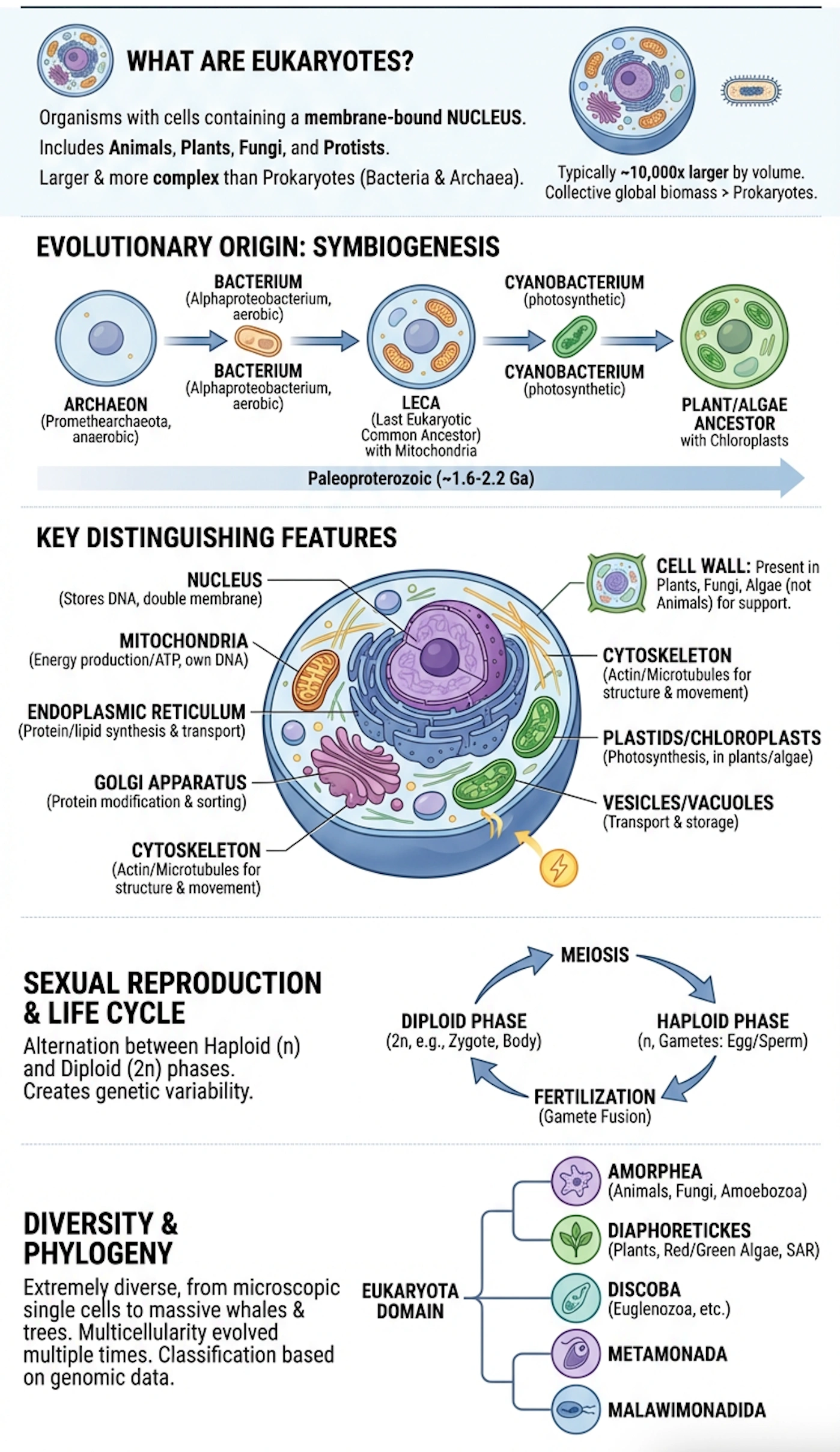
AI Study Infographic
Generated from a lecture in seconds
Trusted by Students Everywhere
“I used to spend 2 hours rewriting my lecture notes. Now I upload the recording and have perfectly organized notes exported to Word in minutes. Total game changer.”
“The Word export is a lifesaver. I generate notes from all my YouTube lectures and compile them into one clean document for exam review. My grades went from B to A.”
“As a study guide creator, this tool is unmatched. I paste my lecture recordings and get a comprehensive study guide I can export to PDF and share with my study group.”
Notes Generator FAQs
What is the best AI notes generator?
The best AI notes generators in 2026 are: (1) LectureScribe — Best overall for auto-generating notes from lectures with export to Word, PDF, and Google Docs ($0-12/mo), (2) Notion AI — Best for manual note-taking with AI assistance ($0-10/mo), (3) Otter.ai — Best for live transcription only ($0-17/mo). LectureScribe ranks #1 for creating structured, study-ready notes automatically.
How do I export notes to Word?
With LectureScribe, export notes to Word in one click: (1) Generate your notes from any lecture or document, (2) Click the "Export" button, (3) Select "Word (.docx)" format. Your notes are exported with proper headings, formatting, and structure preserved — ready to open in Microsoft Word or Google Docs.
Can I generate notes from a YouTube video?
Yes! Paste any YouTube video URL into LectureScribe and AI will transcribe the video, extract key concepts, and generate structured study notes automatically. You can then export to Word, PDF, or Google Docs. Works with lectures, tutorials, and educational videos of any length.
Is there a free notes generator for students?
Yes, LectureScribe offers a free notes generator. You get 1 free upload to generate AI-powered study notes with no credit card required. Notes can be exported to Word (.docx), PDF, or Google Docs format. The free plan includes full AI note generation, formatting, and export features.
What is a study guide creator?
A study guide creator is a tool that helps you build organized study materials from your course content. LectureScribe is an AI-powered study guide creator that automatically generates comprehensive study guides from lectures, notes, and textbooks — complete with key concepts, definitions, practice questions, and exportable to Word or PDF.
Can I convert my notes to PDF?
Absolutely! LectureScribe lets you export notes to PDF with one click. Your notes are formatted with proper headings, bullet points, and structure. PDFs are perfect for printing, sharing with study groups, or storing offline. You can also export to Word (.docx) and Google Docs.
What formats does the notes generator support?
LectureScribe accepts: audio recordings (MP3, M4A, WAV), YouTube video links, PDFs, images (including handwritten notes), and documents. For export, it supports Word (.docx), PDF, Google Docs, and plain text. Notes can be formatted as outlines, Cornell notes, or summaries.
Ready to Generate Your Study Notes?
Stop rewriting lectures by hand. AI creates structured notes and exports to Word, PDF, or Google Docs. Free to start.
Generate Notes Free