Dual Coding: How Turning Notes Into Visuals Doubles What You Remember
Dual coding learning is one of the most reliable, research-backed ways to remember more from the same study time. The idea is simple: pair words with meaningful images and your brain builds two paths to the same memory. Here is the science, and exactly how to turn a messy lecture into visuals that stick.
Written by Sarah Mitchell — Education Tech Researcher
Reviewed by Dr. Elena Vance, PhD (Cognitive Psychology)
Key Takeaways
- Dual coding learning works because the brain processes words and images through two separate channels, giving you two routes to the same memory.
- Pairing relevant visuals with text can roughly double recall on delayed tests, an effect known as the picture-superiority effect.
- Only meaningful visuals help. Decorative or cluttered graphics can hurt learning by adding distraction.
- Dual coding is not the same as being a "visual learner" — it benefits nearly everyone.
- You can turn lectures into infographics, flashcards, and quizzes automatically instead of building them by hand.
What dual coding learning actually is
Dual coding learning comes from a theory the Canadian psychologist Allan Paivio proposed in 1971. He argued that human cognition handles two distinct kinds of information through two interconnected systems: a verbal system that processes language, and a nonverbal "imagery" system that processes pictures, spatial relationships, and other sensory representations. When you learn something using both systems at once, you are not just storing one memory trace — you are storing two that reference each other.
The practical payoff is redundancy. If the verbal trace fades or gets blocked under exam pressure, the visual trace can still trigger recall, and vice versa. This is why a student who studied a diagram of the nephron can often "see" where filtration happens even when the exact wording escapes them. Two codes mean two chances to retrieve the answer.
It is worth separating dual coding from the popular but poorly-supported idea of fixed learning styles. The claim that some people are "visual learners" who should only receive visual material has repeatedly failed to hold up in controlled studies. Dual coding makes the opposite claim: combining words and images helps almost everyone, regardless of preference, because it leverages how memory is built rather than catering to a personality trait.
The research behind the doubling claim
The headline number — that visuals can double recall — traces back to a cluster of findings known as the picture-superiority effect. Across decades of experiments, people who study items as pictures, or as words paired with pictures, consistently outperform those who study words alone, and the gap widens on delayed tests where forgetting has had time to set in. Hermann Ebbinghaus first mapped that forgetting curve in the 1880s; dual coding is one of the few encoding techniques that meaningfully flattens it.
In Dunlosky and colleagues' influential 2013 review of study techniques, the highest-rated strategies were practice testing and distributed practice. Dual coding was rated lower — not because it does not work, but because its benefit depends heavily on doing it well. That nuance matters: a clear, concept-mirroring diagram is powerful, while a page decorated with irrelevant clip art is not. The technique rewards precision.
There is a related lesson from Mueller and Oppenheimer's work on handwriting versus typing. Students who handwrote notes tended to process and reframe ideas in their own words rather than transcribe verbatim, which aided understanding. Drawing a concept yourself works the same way: the act of deciding how to represent an idea visually forces you to understand its structure first. That generative effort is part of why dual coding sticks.
Watch out: Richard Mayer's research on multimedia learning shows that adding interesting-but-irrelevant images, text, or sounds — what he calls "seductive details" — can actually reduce learning. The goal of dual coding is meaningful representation, not decoration. If a visual does not carry the concept, leave it out.
Why pairing words and images works in the brain
Working memory has a limited capacity, and it is one of the biggest bottlenecks in studying. Mayer and Sweller's cognitive load research found that working memory has somewhat separate sub-channels for verbal and visual material. Push everything through one channel — for example, a wall of dense text — and it overloads. Split the load across both channels with words and a diagram, and you effectively widen the pipe, letting more information through before saturation.
This is also where Robert Bjork's concept of "desirable difficulties" fits in. Constructing your own visual is harder than copying a slide, and that difficulty is the point: effortful encoding produces more durable memories than passive review. Reorganizing a lecture into a flowchart you designed yourself is a form of generative, desirable difficulty that pays off later.
The encoding-retrieval link explains the rest. When you later try to recall the material, any cue connected to either code can unlock the memory. A keyword on the exam might surface the diagram; a remembered shape might surface the definition. More connections at encoding means more retrieval cues later. This is the same logic behind the active recall study method and spaced repetition, which is why these techniques stack so well together.
Matching the right visual to the right idea
The single most common dual coding mistake is reaching for a generic mind-map for everything. Different kinds of ideas have different underlying structures, and a good visual should mirror that structure. In our testing with students, the moment a concept clicks visually is almost always the moment the diagram type actually matches the logic of the material.
| Type of concept | Best visual | Example subject |
|---|---|---|
| Step-by-step process | Flowchart / cycle diagram | Krebs cycle, legal procedure |
| Order of events | Timeline | History, drug pharmacokinetics |
| Structure or anatomy | Labeled diagram | The heart, a cell, a circuit |
| Two or more options | Comparison matrix | Bacteria vs viruses |
| Hierarchy / categories | Tree diagram | Taxonomy, court system |
| Cause and effect | Concept map with arrows | Economics, feedback loops |
Once you have chosen a structure, keep the words on the visual short and precise. A label, not a paragraph. The verbal and visual codes need to be physically linked — the term sitting on the part of the diagram it describes — rather than split across separate pages, which forces the brain to do extra integration work and burns working memory.
How to turn a lecture into dual-coded visuals
Here is the workflow we recommend, whether you do it by hand or with a tool. Doing it manually is genuinely valuable for the generative effort, but it is slow — an hour-long lecture can take just as long to convert. The steps are the same either way.
- Capture the source. Record the lecture, scan the PDF, or photograph your handwritten notes so you have a full text record.
- Find the load-bearing ideas. Pull out the 5 to 10 concepts that carry the most weight — the processes, hierarchies, comparisons, and cause-effect chains.
- Pick a matching structure. Use the table above to choose the diagram type that mirrors each idea.
- Pair words with the image. Place short labels directly onto the visual so the two codes are linked.
- Test recall from the visual. Cover the labels, rebuild the diagram from memory, then check — on a spaced schedule.
That final step is what turns dual coding from a pretty study aid into real retention. Encoding visually is only half the loop; you still need retrieval practice. Many students pair their visuals with AI flashcards and practice quizzes so each diagram has a built-in self-test attached to it.
Pro tip: Do not redraw a slide deck that is already well-designed. Save dual coding for the dense, text-heavy lectures and your messy handwritten notes — that is where converting words into structure delivers the biggest gain.
Automating dual coding from your lectures
The honest limitation of dual coding is time. Building good visuals by hand is slow, and during a packed exam week most students simply skip it. This is where LectureScribe changes the math. You upload audio, video, a PDF, images, or photos of handwritten notes — up to 100MB, multiple pages at once — and it transcribes the content with speaker identification and reads handwriting, including math equations and technical symbols, at around 98% accuracy.
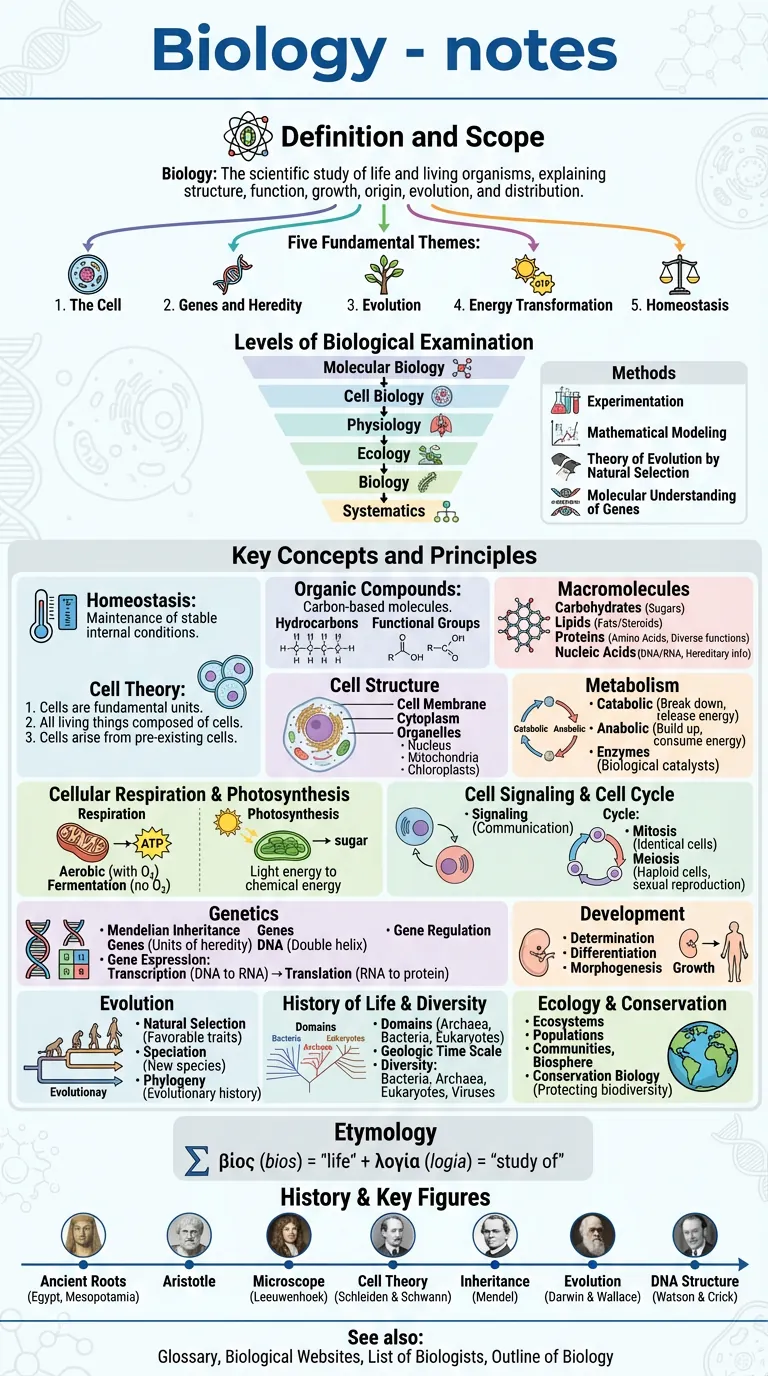
From that single upload it auto-generates the dual-coded study set for you: visual infographics drawn from a 200+ template collection, comprehensive study guides, flashcards, quizzes, narrated video lectures, and 60-second study shorts. The infographics are the visual half of the equation; the flashcards and quizzes are the retrieval half. You can also build a set straight from a recording with the lecture-to-flashcards tool, or convert a reading with the PDF-to-flashcards tool.
It is worth being fair about alternatives. Generic chatbots like ChatGPT or Gemini can describe dual coding but are not grounded in your actual lecture, so they invent details. NotebookLM is closer because it works from your sources, but it is less of a full study-material generator. Otter handles transcription only. Quizlet and Anki are excellent for review but leave you to build every card by hand. LectureScribe's niche is doing the whole pipeline — from your real material to visuals, cards, and tests — while its AI tutor stays grounded in your specific notes rather than the open internet.
By the numbers: Over 25,000 students use LectureScribe, and you can export everything you generate to Anki, Quizlet, Markdown, or PDF — you own your data. Dual coding only helps if you actually keep reviewing the visuals, so portability matters.
Stacking dual coding with your other methods
Dual coding is an encoding technique — it makes the initial learning stronger. To convert that into lasting memory, layer it with retrieval-based methods. The sequence that works best in practice is: encode the concept as a dual-coded visual, then quiz yourself on it from memory, then space those quizzes out across days and weeks so the forgetting curve never fully takes hold.
This pairing is especially valuable for dense, structure-heavy fields. For med students and nursing students, pathways and anatomy are inherently visual, so dual coding fits naturally. The same goes for chemistry students mapping reaction mechanisms. If you are heading into a high-stakes stretch, our guide on how to build a finals-week study plan shows how to schedule visual encoding and spaced review together.
The takeaway is that no single technique wins alone. Dual coding gets more information in cleanly; active recall and spacing keep it there. Used together, they are far stronger than either on its own.
Frequently asked questions
What is dual coding in learning?
Dual coding is a learning principle from Allan Paivio's 1971 theory stating that the brain processes verbal information and visual information through two separate but connected channels. When you encode an idea both as words and as an image, you create two retrieval routes instead of one, which makes the memory more durable and easier to recall.
Does dual coding really double how much you remember?
Studies of the picture-superiority effect consistently show that pairing words with relevant images can roughly double recall compared to words alone, especially on delayed tests. The exact gain depends on how well the visual maps to the concept. A diagram that genuinely represents the structure of an idea helps far more than a decorative stock photo.
How is dual coding different from being a visual learner?
The popular learning-styles idea that some people are visual learners is not well supported by evidence. Dual coding is different: it benefits almost everyone because it uses two memory channels rather than catering to a personal preference. You do not need to be a visual learner to gain from turning notes into diagrams.
How do I turn my lecture notes into visuals quickly?
You can sketch concept maps, timelines, and labeled diagrams by hand, or speed it up with a tool. LectureScribe lets you upload a recorded lecture, PDF, or photo of handwritten notes and auto-generates infographics, study guides, and flashcards, so you spend your time studying the visuals rather than building them.
Is dual coding the same as just adding pictures to my notes?
No. Effective dual coding uses visuals that carry the meaning of the concept, such as a flowchart of a process or a labeled cross-section, not decorative images. Research warns that irrelevant or overly busy graphics can actually hurt learning, so the goal is meaningful representation, not decoration.
Can I combine dual coding with active recall and spaced repetition?
Yes, and you should. Dual coding strengthens how an idea is encoded, while active recall and spaced repetition strengthen retrieval over time. LectureScribe pairs visual study guides and infographics with auto-generated flashcards and quizzes so you can encode visually and then test yourself on a spaced schedule. For more, see our active recall guide.
Turn your next lecture into visuals automatically
Stop redrawing slides by hand. Upload a lecture, PDF, or photo of your notes and let LectureScribe generate infographics, flashcards, and quizzes in seconds — free to start.
Try LectureScribe free